Customer accounts are very important for your store. They allow you to better understand your customers, as well as their expectations.
To access it: Customers > Customers
Why are customer accounts useful?
The 'Clients' section allows you to view the details of your customer accounts. With it, you can create groups of customers to whom you can apply discounts, view current carts, or manage after-sales service.
The demonstration customer account.
Upon the installation of your store, PrestaShop creates a default user: John Doe. This demonstration customer is very useful for testing the functionalities of your store. Thanks to this account, you can navigate the pages as a normal customer would.
To log in to your store with this account, please use the following credentials:
- Email address: pub@prestashop.com
- Password: 123456789
| 💡 Before opening your store to the public, we recommend that you delete this default customer. Malicious users could use it to create false orders. |
How to conduct searches among your client accounts?
The client account management interface is presented as follows:
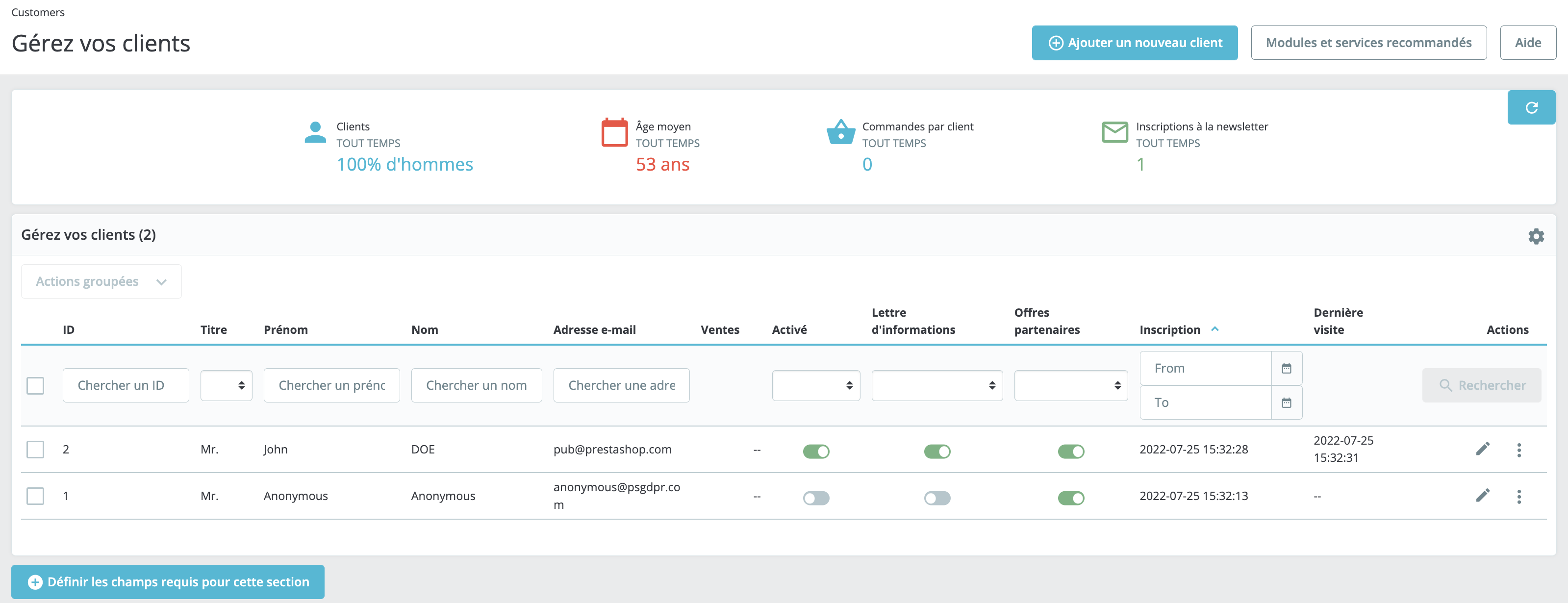
It displays the list of all your clients. You may use the following parameters to sort the accounts or search for a client:
- ID: the unique identifier of your customer, automatically assigned by PrestaShop.
- Title: the customer can indicate their title of civility, which may assist you in better personalizing the use of your store by your customers.
- Enabled: indicates whether the account is active or not. You can deactivate an account by clicking on the toggle button.
- Information letter: indicates whether the client is subscribed to your newsletter or not. You can unsubscribe them by clicking on the toggle button.
- Partner offers: indicates whether the client agrees to receive messages from your partners or not. You can unsubscribe them by clicking on the toggle button.
| 💡 "Registration" and "last visit" can prove useful for filtering customer accounts. If you wish to add information to the profiles of your new clients, for example. |
- Actions: you can modify a user's account, view their data (including their messages, orders, address, discount vouchers, etc.), or even delete it permanently.
How to export your client list?
Exporting the customer list is useful in many cases; for instance, if you wish to retrieve their contacts to send a newsletter.
The export file provides you with access to all of your customers' information: email preferences, consent for sending partner offers, registration date, number of sales, login credentials of your customers... This can be very useful if your customers contact you because they have lost their password, for example.
- Click on the gear icon in the top right corner to open the advanced settings.
- Click on "Export".
| 💡 To best display the information contained in your CSV file, separate the data with a semicolon. |